
Hello, Snap-On,
I'm trying to fix a friend's Snap-On MT2500 scanner that was taken apart.
Where can I find a wiring diagram for the insides? Specifically,...
I'm pretty sure that the three wires shown, coming from the Thumb-wheel,
go onto the J7 connector: Red on the Left, Black on the Right. Is that correct?
There's another similar-looking three wires, coming from the Yes/No buttons on the lid.
I think they go to the J8 connector, but... where?
1. Red on the left?
2. Does that set go into J8 1-2-3 or into J8 2-3-4?
Please reply with (a link to?) the wiring diagram.
And now, for the original problems...
This thing was disassembled, trying to find a reason for these problems...
1. The 9VDC battery is constantly draining.
When the 9v is plugged in, it goes dead after 30 minutes.
That's when the unit is not connected to a vehicle, and nothing is showing in the display.
2. When the unit is not connected to a vehicle,
the "Quick ID" button must be pressed constantly, in order for anything to appear in the display.
If you release that small red button, the display goes blank. Is that normal?
Besides replacing the unit, can you tell me of a solution to those problems?
Thanks very much for your time, people.
Marksnap
I'm trying to fix a friend's Snap-On MT2500 scanner that was taken apart.
Where can I find a wiring diagram for the insides? Specifically,...
I'm pretty sure that the three wires shown, coming from the Thumb-wheel,
go onto the J7 connector: Red on the Left, Black on the Right. Is that correct?
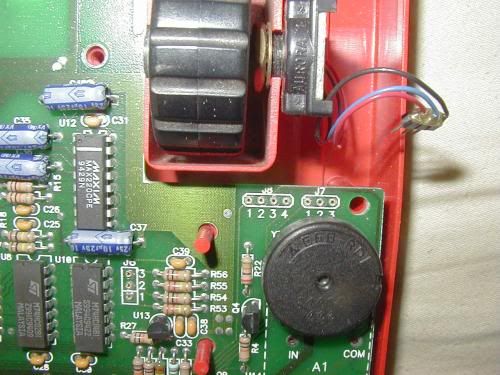
There's another similar-looking three wires, coming from the Yes/No buttons on the lid.
I think they go to the J8 connector, but... where?
1. Red on the left?
2. Does that set go into J8 1-2-3 or into J8 2-3-4?
Please reply with (a link to?) the wiring diagram.
And now, for the original problems...
This thing was disassembled, trying to find a reason for these problems...
1. The 9VDC battery is constantly draining.
When the 9v is plugged in, it goes dead after 30 minutes.
That's when the unit is not connected to a vehicle, and nothing is showing in the display.
2. When the unit is not connected to a vehicle,
the "Quick ID" button must be pressed constantly, in order for anything to appear in the display.
If you release that small red button, the display goes blank. Is that normal?
Besides replacing the unit, can you tell me of a solution to those problems?
Thanks very much for your time, people.
Marksnap


Comment